If you create a video and mark it as private, you can still share the video with others while still keeping it private.
When you publish your YouTube video you will see the options for Private, Unlisted, and Public. What is nice is, under Private you will see a link to Share Privately.
You will then see the ability to email others to see the video. Please note that the users must have a Google account to view the video.
If you (or a student) would like to have selected text read aloud, simply use the Select to speak option. This option is available in the accessibility section on a Chromebook (select the area near the clock, choose accessibility and then Select to speak).
When you have a section you would like to be read aloud, make sure to choose the option, and then a text box will appear that you can drag to include the text you would like included.
Embedded below is a 2 minute and 16 second YouTube tutorial that includes the above as well as a few tips and tricks.
Google recently added the long awaited addition of adding text style in your Google Forms.
To change the font, simply choose the paint palette (Customize Theme) in the upper right and you will see the options you see below. You will see there are three sections: Header, Question, and Text. You can then adjust the text style and text size to fit your needs.
Embedded below is a 1 minute and 9 second YouTube tutorial.
If you would like to be able to create a reading list of pages on the web quickly and see all bookmarks in Google Chrome simply select the icon to the right of the extension icon to the right of the address bar (see image below). The extension icon looks like a puzzle piece and the side panel icon looks like a white rectangle and grey rectangle.
When you select the side panel icon you will see the ability to add the current tab you are reading to your reading list as well as the ability to see all your bookmarks quickly and easily.
Embedded below is a 1 minute and 27 second YouTube tutorial.
Recently Google started to release the "upgrade" on the ability to add emojis directly into Google Docs. Previously users had to go to Insert> Emojis and then proceed from there.
With the new update, users can use the @ symbol and type in the emoji of choice. For example when you type in @dogs, make sure to scroll down a bit as the popup menu will show you people first, and then places, etc. However, it is a short scroll and you can see many of the emojis to select from.
A fun and engaging way for students to show what they know about events from the past or simply a conversation between 2 characters is to create a text conversation using a site like Fakewhatsappgenerator.
When users enter into the site they will see the ability to select the phone settings, battery options, connection, and most importantly - the messages (see image below).
In the 2 minute and 17 second YouTube tutorial below I take you through the steps necessary to get a full conversation as well as one way to make it look like it was on a phone.
If you ever were curious exactly where a raindrop ends up, check out River Runner (also a World version is available in Beta).
Type in a place you would like to see where the raindrop ends up at the end of its journey. A video is created and you see a tour of the path of the raindrop.
Embedded below is a 1 minute and 20 second YouTube tutorial.
If you work with a number of Chromebooks, or you would like to quickly and easily know the Asset Tag and Serial Number without logging on, use Alt +V on the sign-in screen.
Google recently added the ability to create pageless documents. This is nice because you can create a document as long as you like without having to worry about paragraphs or sentences jumping to the next page and breaking the formatting. They will flow just like a website does, a forever scroll. This is nice for your students/families or others as they can just scroll through the information. Check out how to change any Document into a Pageless Document with just a couple of clicks.
Open a Google Document.
Click on “File” and then “Page Setup”.
Select the “Pageless” tab at the top.
If you want to set the page background color you can do that as well.
Click “Ok” at the bottom to set this change.
This can all be undone and set back to regular pages by going back into Page Setup, choosing the “Pages” tab, and clicking “Ok”.
Embedded below is a 1 minute and 47 second YouTube tutorial.
Utilizing multiple Google Chrome accounts can be very beneficial as it keeps personal accounts and work accounts separate.
If you want to quickly see how to create multiple accounts, please click on the 1 minute video embedded below.
Below that you will see a 1 minute and 31 second video showing you the benefits of pinning those accounts and how to quickly launch a specific site right away.
Click below for how to pin those accounts and what right-clicking does for you.
If you would like to remove the background of a photo, make sure to update your device to iOS 16. You can then touch and hold the subject of interest in the photo and then you will see a highlight going around the subject. Then make sure to copy or share.
One more thing, when you send a text message too fast and you want to edit it - touch and hold the message and choose to edit. It will then let you know it was edited and the receiver knows that the message was edited.
Fontmeme has a simple and easy to use text generator with lots of options. Simply enter into the site and choose your font and then scroll down to enter in your text as well as adjust the size of the text as well as any kind of effect and color. Make sure to then generate the text in the font your choose.
You can then select the pencil to see all the options you would like.
I did not adjust anything and right-clicked on the image and copied it into a Google Doc.
See the images below as well as a 1 minute and 25 second YouTube tutorial.
MapPuzzle is a fun online interactive map game where you drag and drop countries or states onto a world map.
You can see in the image below the options to try World Borders, Spanish Provinces, USA States, etc. You can also reset the game as well. Make sure when you select the country/province/state - you click on it and then drag to the appropriate spot on the map and click on it.
Embedded below is a 1 minute and 4 second YouTube tutorial.
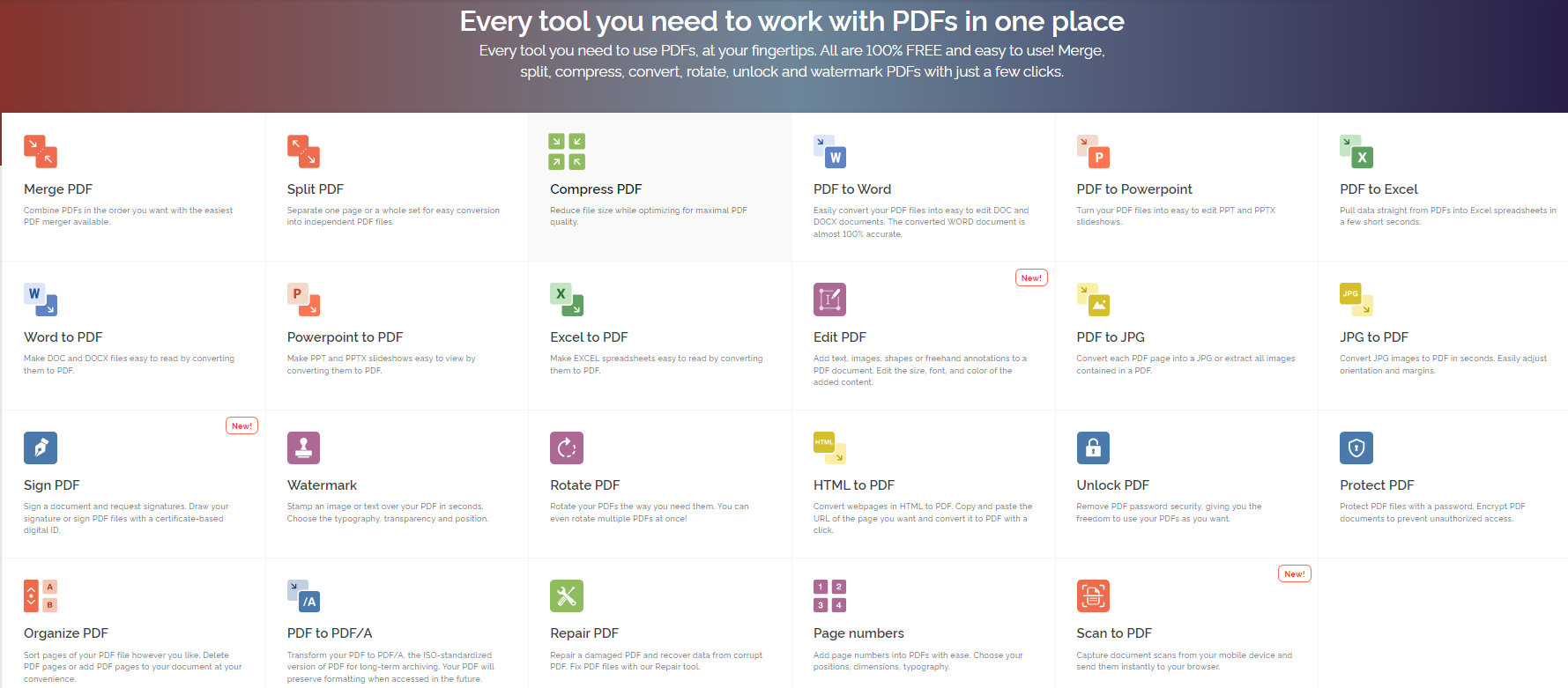
One of the most common questions I am asked revolves around PDFs and how to edit them. While nothing is perfect, Ilovepdf allows you the options you see below.
Embedded below is a 2 minute and 16 second YouTube tutorial showing how to edit as well as convert your PDF to a Word Document.
If you would like the font size larger on your Windows 10 device there are two ways to do it. You will be going to the Accessibility settings on your computer.
Press the Windows logo key+U or select Start > Settings > Accessibility.
Select Text size. Drag the Text size slider to the right to increase the size of the sample text.
Once you are happy with the size of the text make sure to select Apply.
If you would like to see a tutorial of the ins and outs of Classroomscreen, take a look at the video below. It will show you the different widgets and the new features.
A great feature built into Classroomscreen is the ability to embed a YouTube video directly onto the screen. This could be useful for relaxed music when students enter the day, or for whatever you need.
To access this feature make sure to select more widgets and then video.
Embedded below is a 1 minute and 14 second YouTube tutorial.
If you have used Clssroomscreen in the past you will remember that they had a polling feature, but the remote polling was only if you paid for an upgrade. With the new version of Classroomscreen, you can now use this feature for free (just need to create a free account).
When you choose the polling feature you will see the options for multiple choice, smileys, as well as True/False. When you choose your poll type you will see options to remove and or add options, choose the poll settings, how to vote, as well as the chart type.
If you create an account and sign in, the option of remote polling is available. At the top of the poll you will see how to vote and the specific code users will use. You will also see the option to display a QR code that users can utilize.
The remote voting is great as you have the option to display the voting live, hide the votes, as well as lock the voting.
Embedded below is a 1 minute and 52 second YouTube tutorial.