Saturday, June 25, 2016

Want a crystal clear image of a document to send quickly? Try the scannable app

A friend of mine a few years ago introduced me to the Scannable App when I wanted to send someone a picture of a document I had (we were not near a fax). He told me about Scannable and I was instantly impressed. Long story short the app will instantly scan for a document, take a picture, "clean it up", and then ask where you would like it stored.

I typically will store the picture in my camera roll, unless it is something to store for the future, in which case I will store it in Evernote - which is an amazing site to store all your notes across all devices.  I will post about Evernote in the future (as you can now search Google Drive files in Evernote).

I used the scannable app many times for parents when they needed a file to print out because their child lost it. I would scan the document with Scannable, save it to my camera roll, attach it in an e-mail, and they would sign and return it the same day. It basically took having to go to the copier and scan it.

Below is a screenshot of what Scannable will look like when you use it.

Image Source


Enjoy!


Friday, June 24, 2016

Illustrated Math Dictionary - great resource for all you parents and math teachers out there!

Math is Fun is a great free website that explains math in easy language and includes worksheets, games, puzzles, and quizzes.

Image Source


The dictionary includes over 800 terms with simple definitions and an illustrations.

Image Source
 Below is an example when the user selects symmetry. If the user selects "here's more" - there is quite a bit more useful information.

Image Source

Thursday, June 23, 2016

Want to share in Google Drive quicker? Try this shortcut

Inspired by Alice Keeler (great follow by the way) I started thinking more and more about shortcuts on Google and her recommendation to try to learn a new one every week.

So, if you combine yesterday's post - about Sticky Notes - try posting this shortcut on a Sticky Note and leave it up there for a week.

The shortcut this week if very simple. If you are in Google Drive - select a file in Drive - but do not double click on it. Then select the "greater-than" sign with a period and sharing settings will open up.

I will try to give one shortcut a week to post on your Sticky Notes app.
Brad
Image Source


Wednesday, June 22, 2016

Sticky Notes - best "post-it" note app I've seen

If you use post-it notes - this app is a great one for your computer - Sticky Notes.

It will even allow you to store them on your desktop - when Chrome isn't even active.

You can have multiple notes posted all over your desktop (and can change the color).

Image Source


Post away!
Brad

Monday, June 20, 2016

Need to review terms? Need to create a quiz? Try quizlet.com

Hello all,

Quizlet.com is a great site for reviewing terms and definitions (can be created in numerous languages as well).
Image Source


The site provides the standard "flashcard-type" studying (with the ability to star cards that need to be reviewed) as well as fun games (such as all terms scattered and users must match the terms quickly and an asteroid game) for the users to try. It also gives the user the ability to create a test from the group of terms and definitions.

An app is also available own the App store and Google Play store.

If you would like a detailed 6 minute video I created - click here (or see the video embedded below). Unfortunately, the helpful annotations will not appear on a mobile phone. I hope in the future they will be.


If you would like a fast-forwarded version of the same video above - but in 1 minute - click here (or see embedded video below).


Thanks!
Brad


Gboard - new keyboard for your iPhone - GIFs, emojis, glide typing, and Google Search built in

I am a big fan of the Gboard keyboard - especially the ease of sending GIFs (Graphics Interchange Format) - or more simply think an image moving over and over again (kind of someone giving a high five over and over and over). The other thing I am starting to get used to is "glide typing". Think of dragging your finger on a keyboard and it figuring out what you want to say (works pretty well). Look at the 2nd picture below for an example.

If interested - click here to connect to the iTunes store download the app to your iPhone. 


Image Source

Image Source
Any questions - let me know!
Brad


Sunday, June 19, 2016

Want to send parents a snapshot of your homework board, or communicate with parents of a sports team/club? Use the Remind app

Want a fast, easy way to communicate with parents a simple message like... "remember tomorrow is picture day" or "tomorrow is field day - remember to wear your color."

The Remind app is a great one for communicating those simple messages. 

I also used the app to update parents on our ETA coming back from a field trip to the state capitol, as well as taking a picture of my assignment board everyday. Many parents would tell me how much they appreciated the daily remind text message as they would know what was going on at school before their child would even come home.

While it is great for the classroom teachers out there, it is also great for after school activities, clubs, etc. 

Remind has added new features such as the ability to create a group (such as parent volunteers for a classroom party) and send them a message, as well as the ability to send a private message. This is all done without anyone knowing each other's phone numbers. 

To see a video - click on this link and then watch the 1 minute video explaining how the site works.

Should you have any questions, please send me a message through Facebook, or comment below.

Thanks,
Brad

Image Source

Saturday, June 18, 2016

Happy Father's Day (baseball edition) - Fanzcall app

Happy Father's Day!

I am a huge baseball fan and have found a free and interactive app to try. The app is called Fanzcall.

I was listening to sports talk radio and heard about this new app. The creator of the app was talking about how he loves the game of baseball and took his young sons to their first game. As soon as their favorite player for the Red Sox (David Ortiz) struck out, they were ready to go home. So, he thought of creating an app that would keep his kids entertained and keep them interested in what happens during the game.

So, he created Fanzcall! You create a username and password (or log-in with Facebook). Then you can create a group of just your friends, or you can compete against other users interested in the same game as you. Then, the app instantly shows who is up and you predict what the batter will do - single, doubly, triple/HR, strikeout, or just plain out. You gain points for each correct prediction (I did beat my nephew the other day by predicting a HR for Ryan Braun and received 75 points!) and lose points for each incorrect prediction. While the winner gain bragging rights, all users have enjoyed the experience!

Here are a few pictures from the site. Check it out!

Image Source

Happy Father's Day to all the dads out there!

Brad


Friday, June 17, 2016

Quickly looking to create an on-line quiz? Try www.quizzyrocks.com

Hello everyone,

If you want to make an easy online multiple choice quiz try  https://www.quizzy.rocks. While the site does not store data for the users - it does mark the quiz instantly. I used it this year in a 1st grade classroom and the students showed the 1st grade teacher and myself their results. The students also had the chance to re-take the quiz.

Image Source


I have created 2 videos on how to use the site.

Click here for a set-by-step video (about 2 and 1/2 minutes long).

Click here for a fast-forwarded version of the video above (37 seconds long).

In short, if you are looking for a fast, fun, easy way to create a quiz - give https://www.quizzy.rocks a try!

Any questions - let me know!

Thanks,
Brad


Love green grass? Try the "Mylawn" app by Scotts

Every once in awhile I will post something out there that is "tech" that does not necessarily have to do with education. In this case it is the Mylawn app by Scotts. I am a huge fan of this app!!

I find this app to be very user friendly as gives you a detailed plan for your lawn. It will suggest what and when to apply the product, the benefits to the product, how much rain is in the forecast, as well as keeps track of what and when you applied the product(s).

This is the first year I have followed through with all of their recommendations and so far - so good!

Image Source


Brad

Thursday, June 16, 2016

Typingclub.com - great site for practicing typing skills.

If you would like your child or students to improve upon their typing (gotta love the hunt and peck method) - try https://www.typingclub.com
Image Source


The site has 100 levels for the students to master. No sign-in required. However, if you want to save your progress a username and password is needed. Click here for their Privacy Policy.

Users can jump ahead to any lesson they wish. A nice feature of the site is that it does keep stats to let you know how you are doing.

Image Source


Wednesday, June 15, 2016

Ok - best shortcut for a Chromebook. The granddaddy of them all....

CTRL - ALT ? - this shows you a keyboard and then all the shortcuts that are available on a Chromebook.

If you look below this is what a screen will look like with a number of shortcuts. The example below just shows if you hit ctrl. Try selecting CTRL and Shift to see even more!

Image Source

Monday, June 13, 2016

Safe site for kids to use to research a topic - try Kiddle.co

While there are quite a few safe-search sites out there, Kiddle.co has been very effective this year at the elementary schools where I work.

For more information - click here

Sunday, June 12, 2016

Have a favorite author and want to find an author that is similar? Try literature-map.com

Many times we find an author we, or students really like, and want to find an author who is similar. Well, with literature-map you can!

Simply log on and type in the author - it will create a cloud type look, with the author you chose in the middle and the most similar in nature to your author will be the closest.

Click here for a 40 second tutorial I created.

In the example below I chose Jerry Spinelli as the author.


Saturday, June 11, 2016

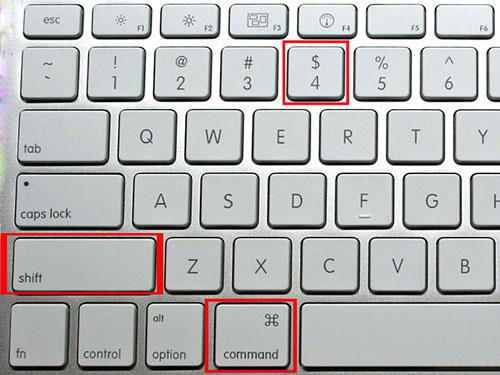
Have a Mac and want to "snip" a picture? Try Command, Shift, 4

Maybe this is more for me. I keep forgetting if it is Cmd Shift 3, 4, 5, or 6! 

Anyway, using Cmd Shift 4 will allow you to "snip" a picture and will store it on your desktop.

Image Source

Friday, June 10, 2016

Use the Chrome App Launcher - or the Chrome Omnibox (address bar) as a calculator

Working on something and can't find a calculator or a phone? Try either using the Chrome App Launcher - or use the Chrome Omnibox (address bar) as a calculator.

Using App Launcher as a calculator

Using the Omnibox (address bar) as a calculator.


Thursday, June 9, 2016

Random Name Generator - Flippity.net

Here is a fun way to create a random name generator - use Flippity.net


Click here for a 1 minute tutorial video that I created.

Click here​ for directions from the site.

Any questions - let me know!
Brad

Wednesday, June 8, 2016

Want to remove ads, navigation, and junk before you print? Try this Chrome Extension

If you find a website that you like and you want to print it out, but you don't want to print out lots of pages, or spend time cutting and pasting - try the Chrome Extension - Print Friendly & PDF.

For example - here is a the first page on History.com's website about the American Revolution.


And here is what happens when you use the extension. 


Tuesday, June 7, 2016

Wordcloud - turn a document into an image - possible Father's Day idea

Want to turn a document into an image - try Wordclouds.com.

Free online Wordcloud generator
"Wordclouds.com is a free online word cloud generator and tag cloud creator. Wordclouds.com works on your PC, Tablet or smartphone. Paste text, upload a document or open an URL to automatically generate a word- or tag cloud. Customize your cloud with shapes, themes, colors and fonts. You can also edit the word list, cloud size and gap size. Wordclouds.com can also generate clickable word clouds with links (image map). When you are satisfied with the result, save the image and share it online."


Below you will see a wordcloud image created using Clement Clark Moore's "A Visit from St. Nicholas"
A Visit from St. Nicholas - Twas the Night before Christmas


 Below you will also see images that are available on the site as well as an example.